
What Is a Runtime Environment? A Complete Guide for Developers

A runtime environment is the infrastructure that executes your code — providing the memory, system calls, libraries, and interpreter your program needs to run. Understanding it is foundational to writing reliable, portable software.
What Is a Runtime Environment?
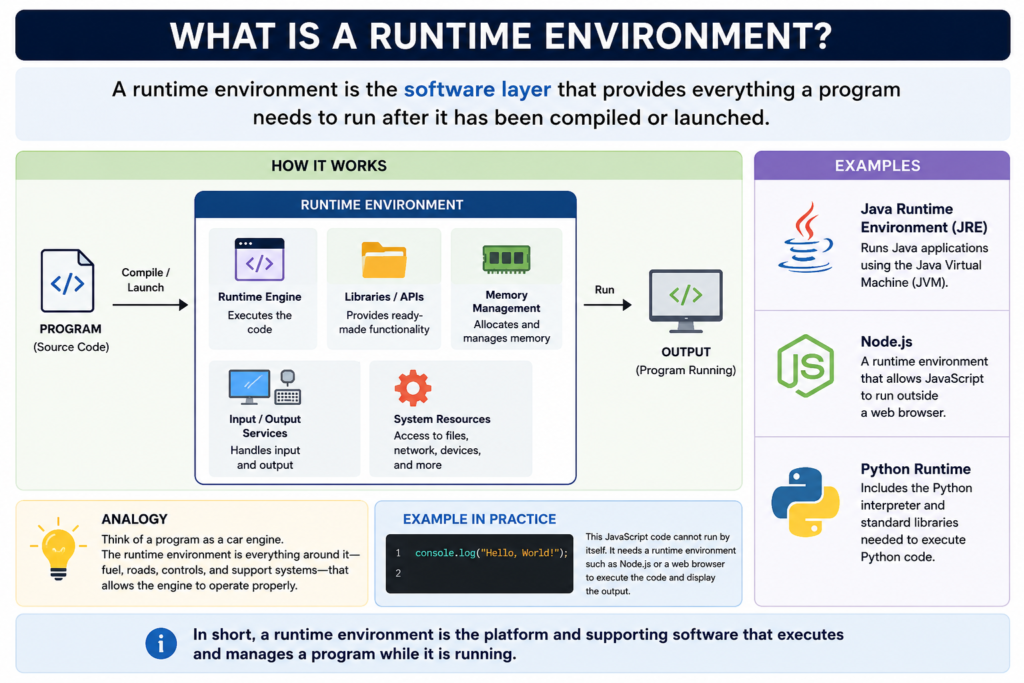
A runtime environment (also called an RTE) is the platform or system that provides everything a program needs to execute correctly. When you write code, it doesn’t run in isolation — it relies on an underlying layer of software that manages memory allocation, provides standard libraries, handles input/output operations, and interfaces with the operating system.
In simple terms: the runtime environment is the “context” in which your program lives while it’s running. Without it, code is just text. With it, that code becomes a living, executing process.
How Does a Runtime Environment Work?
When you run a program, your operating system loads it into memory and hands control to the runtime. The runtime then:
- Allocates and manages memory (stack and heap)
- Resolves dependencies and loads required libraries
- Executes or interprets bytecode or machine instructions
- Handles exceptions and errors gracefully
- Provides garbage collection (in managed runtimes like JVM or .NET CLR)
- Mediates access to system resources like files, network, and I/O
This abstraction layer is what makes languages like Java or Python portable — code written once can run on any machine that has the appropriate runtime environment installed.
Types of Runtime Environments
Browser Runtime
JavaScript executed inside Chrome, Firefox, or Safari via the JS engine.
Server-Side Runtime
Node.js, Python interpreter, JVM — code runs on a server, not a browser.
Containerized Runtime
Docker isolates the runtime so apps behave identically on any host.
Cloud / Serverless
AWS Lambda, Cloudflare Workers — the provider manages the runtime for you.
Key Components of a Runtime Environment
1. Memory Manager
Responsible for allocating memory when objects are created and freeing it when they’re no longer needed. In managed languages, a garbage collector automates this. In languages like C or Rust, the developer manages memory manually or through ownership rules.
2. Standard Library
A set of pre-built functions and modules — for string manipulation, file I/O, networking, math — that your code can call without writing them from scratch. The standard library is part of the runtime and varies by language and platform.
3. Execution Engine
The interpreter or JIT (Just-In-Time) compiler that turns high-level code or bytecode into CPU-executable instructions. V8 (Chrome/Node.js), HotSpot (JVM), and CPython are well-known execution engines.
4. System Call Interface
Provides controlled access to OS-level features — creating processes, reading files, sending network packets — without exposing raw kernel calls directly to application code.
Runtime Environment vs. Development Environment
A development environment is where you write and test code (your IDE, debugger, local server). A runtime environment is where your code actually executes in production. They often differ significantly — and “it works on my machine” bugs are almost always caused by a mismatch between the two.
This is exactly why tools like Docker, virtual machines, and environment managers (like nvm for Node or pyenv for Python) exist — they bring the development environment as close as possible to the production runtime environment.
Popular Runtime Environment Examples
- Node.js — JavaScript runtime built on Chrome’s V8 engine; widely used for backend development
- JVM (Java Virtual Machine) — runs Java, Kotlin, Scala, and Groovy bytecode on any OS
- .NET CLR (Common Language Runtime) — Microsoft’s managed runtime for C#, VB.NET, and F#
- CPython — the reference runtime for the Python programming language
- Deno — a secure, modern TypeScript/JavaScript runtime from the creator of Node.js
- WebAssembly (WASM) — a portable binary runtime that runs near-native code in browsers
Why the Runtime Environment Matters for Developers
Understanding your runtime environment is not optional knowledge — it directly affects performance tuning, debugging, security hardening, and deployment strategy. When something crashes in production, the runtime is often the first place to investigate: memory limits, missing environment variables, version mismatches, or incompatible native dependencies.
Modern DevOps practices like containerization, infrastructure as code, and serverless computing are all, at their core, strategies for managing and standardizing runtime environments across teams and infrastructure.
Frequently Asked Questions
Is a runtime environment the same as an operating system?
No. An operating system is the foundation, but the runtime environment sits on top of it and provides language-specific services your program needs. A Java program uses the JVM as its runtime, which itself runs on top of Linux or Windows.
What is a runtime error?
A runtime error occurs when a program fails during execution, as opposed to a compile-time error. Common causes include null pointer dereferences, division by zero, or out-of-bounds array access. The runtime environment detects these and typically throws an exception.
Can an application have multiple runtime environments?
Yes. A microservices architecture might run Node.js services, Python ML models, and Java APIs simultaneously — each in its own runtime, often inside Docker containers to keep them isolated and reproducible.
How does the runtime environment affect application performance?
Significantly. The runtime’s garbage collector, JIT compiler, thread model, and I/O handling all impact throughput and latency. Tuning JVM heap size or Node.js’s event loop, for example, is a common performance optimisation task.