
The Ultimate Guide to Locksmith Dispatch Software: Features, Benefits

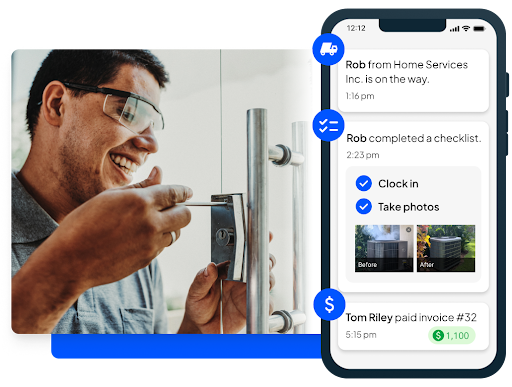
Running a locksmith business is a high-stakes balancing act. Your day often involves juggling emergency lockout calls, managing scheduled security installations, and ensuring your technicians are navigating traffic efficiently to reach customers on time. In an industry where speed and reliability are the currencies of trust, manual processes—like whiteboards, sticky notes, and endless phone tag—are liabilities that slow you down.
To thrive in this competitive landscape, modern businesses are turning to specialized technology solutions. This is where locksmith dispatch software proves invaluable. It acts as the central nervous system of your operation, transforming chaos into streamlined efficiency.
This guide explores everything you need to know about this technology. We will break down its essential features, highlight the tangible benefits for your bottom line, and answer the most frequently asked questions. Whether you are a solo operator looking to expand or a manager of a large fleet, understanding these tools is the first step toward unlocking your business’s full potential.
What is Locksmith Dispatch Software?
At its core, locksmith dispatch software is a specialized field service management platform designed to handle the unique logistical and administrative challenges of the locksmithing industry. Unlike generic calendar apps or basic spreadsheets, this technology integrates every aspect of your business operations into a single, cohesive system.
Think of it as your digital command center. It bridges the gap between your office staff, your technicians in the field, and your customers. The primary purpose of this software is to eliminate the friction that typically exists in service-based workflows. It replaces manual scheduling with automated precision, turns paper invoices into instant digital payments, and transforms scattered customer notes into a comprehensive database.
By centralizing these functions, the software allows business owners to regain control over their daily operations. Instead of reacting to problems as they arise—such as a technician arriving late because of an inefficient route or a lost invoice delay payment—you can proactively manage your resources. It provides real-time visibility into where your technicians are, what jobs they are working on, and how your business is performing financially. Ultimately, it empowers you to deliver a higher standard of service while reducing the administrative burden that leads to burnout.
Key Features of Locksmith Dispatch Software
When evaluating locksmith management tools, it is crucial to look for specific functionalities that address the pain points of the security industry. Top-tier software solutions offer a robust suite of features designed to optimize every stage of the job cycle.
1. Advanced Scheduling and Dispatching
The heart of any management tool is getting the right tech to the right job. Modern platforms allow you to view the real-time location of your technicians via GPS. Much like planning a successful business exit, having a clear roadmap—in this case, route optimization—ensures you maximize your assets and minimize wasted time
Beyond basic scheduling, these tools offer intelligent dispatching capabilities. You can view the real-time location of your technicians via GPS tracking, allowing you to assign emergency lockout jobs to the nearest available tech. Route optimization for technicians is another game-changer, automatically calculating the most efficient path between jobs. This minimizes travel time, reduces fuel consumption, and ensures you can fit more billable hours into a single day.
2. Seamless Invoicing and Payment Processing
Cash flow is king, and delays in billing can cripple a small business. Invoicing and billing solutions integrated into dispatch software ensure that you get paid faster. Technicians can convert work orders into professional invoices directly from the field as soon as a job is complete.
These systems often support multiple price books, allowing you to easily add standard services—like rekeying, lock installation, or transponder key programming—to an invoice with a single tap. Furthermore, secure online payment gateways allow customers to pay immediately via credit card, increasing convenience and reducing the need for chasing down overdue checks.
3. Comprehensive Customer Relationship Management (CRM)
Customer management for locksmiths goes beyond just saving a name and phone number. A built-in CRM creates a detailed profile for every client, storing vital information such as key codes (securely encrypted), service history, installed equipment, and gate access codes.
This centralized database empowers your team to provide personalized service. When a repeat customer calls, your dispatcher instantly knows their history and preferences. Additionally, automated communication tools can send booking confirmations, “technician en route” notifications, and post-job thank-you messages, keeping your customers informed and engaged throughout the process.
4. Reporting and Business Analytics
You cannot improve what you do not measure. High-quality software provides performance dashboards that offer a bird’s-eye view of your business health. You can track critical metrics such as revenue per technician, job completion rates, and average response times.
Customizable reports allow you to dive deeper into specific areas, such as marketing ROI. By tracking lead sources, you can see which advertising channels are driving the most high-value jobs, enabling data-driven decisions on where to invest your marketing budget.
5. Mobile App Functionality
In a mobile-first industry, a robust mobile app for locksmiths is non-negotiable. The mobile interface gives technicians a portable office in their pocket. They can view their schedule, navigate to job sites, access customer notes, and update job statuses in real time.
Crucially, many apps offer offline support. Locksmiths often work in basements, secure facilities, or remote areas with poor signal. Offline functionality ensures they can still access job details and record service notes, with the data syncing automatically once connectivity is restored.
6. Inventory and Asset Management
Managing stock levels for keys, cylinders, locksets, and security hardware can be a logistical nightmare. Integrated inventory management features track your stock in real-time. When a technician adds a part to an invoice, the system automatically deducts it from your inventory count. You can set low-stock alerts to remind you when to reorder, ensuring your vans are always stocked with the necessary tools and equipment to complete the job on the first visit.
Benefits of Using Locksmith Dispatch Software
Investing in technology is not just about keeping up with trends; it is about securing a competitive advantage. Implementing the right software yields measurable improvements across your entire organization.
1. Enhanced Operational Efficiency
The most immediate impact is a dramatic reduction in administrative workload. By automating repetitive tasks like appointment reminders, invoice generation, and route planning, you free up countless hours every week. Automated reminders and notifications mean your office staff spends less time on the phone confirming appointments and more time on high-value tasks like sales and customer service. This streamlined workflow eliminates manual errors, such as double-booking or lost paperwork, which can damage your reputation and cost you money.
2. Superior Customer Experience
In the locksmith industry, customers are often in distress—locked out of their cars or homes—and their patience is thin. Dispatch software allows you to provide a calm, transparent, and professional experience. Real-time updates on technician arrival times manage customer expectations effectively.
Furthermore, client portals allow commercial customers to log in, view their service history, approve estimates, and pay invoices online. This level of convenience and transparency builds trust and encourages repeat business, turning one-time emergency callers into loyal, long-term clients.
3. Business Growth and Scalability
Many locksmith businesses hit a ceiling where they cannot handle more work without hiring more administrative staff. Dispatch software breaks this ceiling. Because the system handles the heavy lifting of coordination and data entry, your existing team can manage a significantly larger volume of jobs.
Additionally, the software provides the infrastructure needed to scale. Whether you are adding one new van or expanding to a new city, the standardized processes within the software ensure that your service quality remains consistent as you grow.
4. Significant Cost Savings
While software comes with a subscription cost, the return on investment is often substantial. Route optimization directly lowers fuel costs and vehicle wear and tear by reducing unnecessary mileage. Inventory tracking prevents the loss of expensive hardware and ensures you aren’t tying up cash in dead stock. Perhaps most importantly, accurate billing ensures every minute of labor and every part used is accounted for, plugging leaks in your revenue stream.
How to Choose the Best Locksmith Dispatch Software
With numerous options available, selecting the right platform requires careful consideration of your specific business needs.
Assess Your Requirements:
Start by identifying your biggest pain points. Do you struggle with scheduling efficiency? Is inventory shrinkage a problem? Do you need better communication with customers? Prioritize software that excels in these specific areas.
Compare Features and Integrations:
Look for platforms that offer QuickBooks integration for locksmith businesses. This is a vital feature that allows your dispatch software to sync seamlessly with your accounting tools, saving hours of bookkeeping time. Compare top contenders like FieldEdge, Housecall Pro, and Workiz based on their feature sets. Do they offer the specific mobile capabilities your techs need? Is the dispatch board customizable to your workflow?
Evaluate Pricing and Scalability:
Pricing models vary—some charge per user, while others charge a flat monthly fee. Consider not just the current cost, but how the pricing will scale as you add more technicians. Ensure the software can grow with you without becoming prohibitively expensive.
Test Support and Usability:
Finally, take advantage of free trials and demos. The best software is the one your team will actually use. Test the interface for user-friendliness. Call their customer support line to see how responsive they are. You want a partner who will help you troubleshoot issues quickly, ensuring your operations never skip a beat.
FAQs About Locksmith Dispatch Software
1. What is locksmith dispatch software?
At its core, this software functions like an on demand multi service app, connecting customers and technicians instantly while organizing every aspect of the service workflow within a single system.
2. Can the software handle recurring appointments?
Yes, most locksmith scheduling software includes robust features for managing recurring jobs. This is particularly useful for commercial contracts that require regular maintenance, security audits, or master key system updates. You can set the frequency (weekly, monthly, annually) and the system will automatically populate your schedule.
3. Does the software integrate with accounting tools?
Integration is a standard feature for top-tier platforms. Most offer seamless syncing with QuickBooks Online and Desktop, as well as Xero. This ensures that when an invoice is paid in the field, your accounting records are updated instantly, eliminating double data entry.
4. How does it improve customer retention?
By professionalizing every touchpoint. Automated text reminders reduce no-shows, while CRM features ensure you remember client details for personalized service. Fast response times and transparent communication via the software make customers feel valued and secure, increasing the likelihood they will call you again.
5. Is there a mobile app for technicians?
Yes, a mobile app is a critical component. It empowers technicians to work independently in the field. They can receive job details, navigate to sites, create estimates, and process payments all from their smartphone or tablet, often even without an active internet connection.
6. How does it help with marketing?
Many platforms include marketing modules that help you capitalize on your customer database. You can run email campaigns to promote security upgrades, automate requests for online reviews after a job is completed, and track the ROI of different lead sources to optimize your advertising spend.
Conclusion
The locksmith industry is evolving, and the businesses that adapt are the ones that will thrive. Moving away from manual processes and adopting specialized dispatch software is no longer just a luxury—it is a necessity for staying competitive. By streamlining your scheduling, empowering your technicians with mobile tools, and delivering a superior customer experience, you position your business for sustainable growth.
Do not let administrative chaos hold you back. Take the time to evaluate your options, leverage free trials, and find the solution that fits your workflow. Ready to streamline your locksmith business? Try a demo today and unlock a more efficient, profitable future.
About The Author